
As an Amazon Associate, Ergoluma earns from qualifying purchases. Our guides are built from manufacturer-published specifications — we compare the spec sheets so you don’t have to.
Every office chair claims to be ergonomic. The word has been stretched so thin it barely means anything on a product page. But underneath the marketing, there are about five adjustments that separate a chair that fits your body from one that fights it. Learn what those five are, and you can evaluate any chair in about two minutes.
Lumbar support is not one thing
“Lumbar support” on a spec sheet can mean three very different things: a fixed bump in the backrest, a pad you can slide up and down, or a system you can tune for both position and firmness. Only the last two are worth paying for, because lumbar needs vary enormously between bodies — a support fixed at the wrong height is worse than none at all.
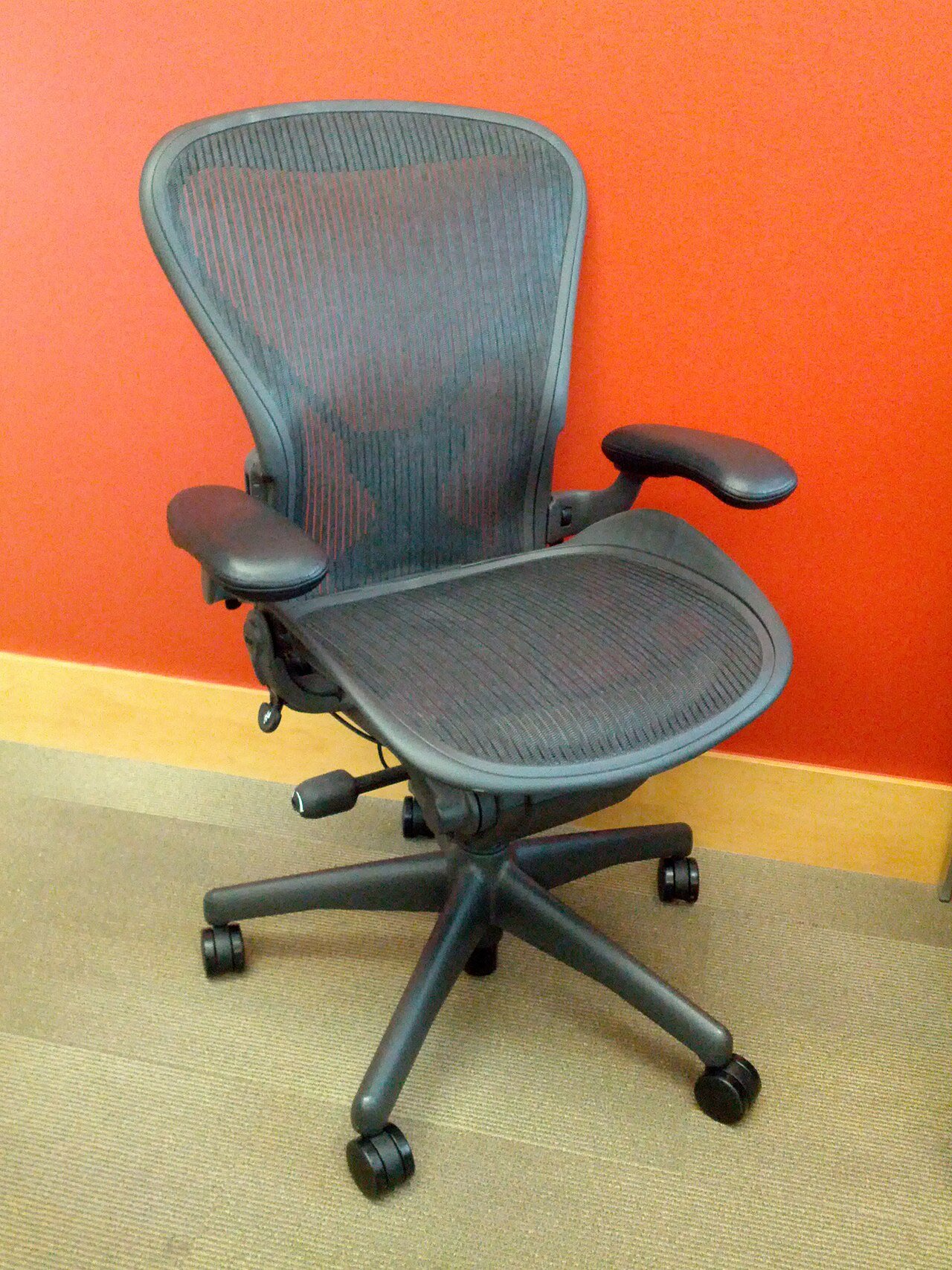
The two reference designs show the range. Herman Miller’s Aeron uses PostureFit SL, pads that adjust for height and depth to support the sacrum and lumbar region. Steelcase’s Leap V2 goes further: its lumbar adjusts for height and firmness independently, so you can dial in both where the support sits and how hard it pushes. If a chair’s lumbar doesn’t move, treat the “ergonomic” label with skepticism.
Seat depth: the adjustment most chairs skip
Here’s a quick test you can do in any chair: sit all the way back and check the gap between the front edge of the seat and the back of your knees. You want roughly two to three fingers of space — about 2 to 3 inches. Too much seat depth and the edge presses into your legs; too little and your thighs lose support.
This is where the Leap V2 earns its reputation: its seat slides through about 3 inches of depth adjustment (15.75″–18.75″), so it fits a wide range of leg lengths. The Aeron takes a different approach — it comes in three shell sizes (A, B, C), and you pick the right one for your body instead of adjusting. Both approaches work; what doesn’t work is a one-size seat with no depth adjustment and no size options, which describes most chairs under $300.
Armrests: 4D sounds like marketing until you need it
Armrests matter most for one specific thing: keeping your shoulders relaxed while you type. That means the armrests need to sit just below your elbow height, close enough that your arms rest naturally without reaching outward.
The Aeron’s fully adjustable arms move in four directions — height (6.8″–10.8″ above the seat), width, pivot, and depth. The Leap V2’s 4D arms adjust for height (7″–11″ above the seat), width (12.75″–20″ apart), depth, and pivot angle. Chairs with height-only armrests, or worse, fixed arms, force your shoulders into whatever position the designer guessed. If you do focused keyboard work all day, adjustable arms are one of the highest-value features on the chair.
Tilt mechanisms: what “synchro-tilt” does for you
When you lean back, a good chair keeps your feet on the floor and your eyes roughly on the monitor. That’s the tilt mechanism’s job. The Aeron’s Kinemat tilt moves the seat and backrest through a natural arc, with a tilt limiter and a forward-tilt option for task work. The Leap V2 reclines from 96° to 120° with a five-position lock, and its Natural Glide System slides the seat forward as you recline so your posture stays open.
What to look for on a spec sheet: a tilt lock (so you can fix your preferred angle), tension control (so the recline resistance matches your weight), and ideally a forward tilt option for close-up work. A chair that only rocks freely with no lock will annoy you within a week.
Two chairs that define the category
Herman Miller Aeron (Remastered)

- Sizes: A (small), B (medium), C (large) — separate shells, sized by body measurements
- Weight limits: 300 lbs (size A); 350 lbs (sizes B and C)
- Lumbar: PostureFit SL, height- and depth-adjustable
- Tilt: Kinemat tilt with limiter and forward-tilt lock
- Material: 8Z Pellicle elastomeric mesh (breathable, no heat buildup)
- Warranty: 12 years
The Aeron’s defining trait is the mesh: eight zones of varying tension that distribute weight without pressure points, and it doesn’t trap heat the way foam does. The trade-off is firmness — the Aeron is a precise, firm sit, and people who like cushioning often prefer foam. Size B fits most users; check Herman Miller’s sizing chart against your measurements rather than guessing.
Steelcase Leap V2

- Seat height: 15.5″–20.5″
- Seat depth: 15.75″–18.75″ (3″ of slide adjustment)
- Weight capacity: 400 lbs
- Back: LiveBack flexible shell — upper and lower zones flex independently as you move
- Lumbar: height- and firmness-adjustable, independently
- Arms: 4-way adjustable (height, width, depth, pivot)
- Warranty: 12 years
The Leap’s LiveBack is the feature that converts skeptics: the backrest changes shape as your spine moves, so it keeps supporting you whether you’re leaning in to type or leaning back to think. It fits users from about 5’2″ to 6’5″ in a single size, which makes it the simpler choice if you’re buying without sitting first.
How to size a chair before you buy
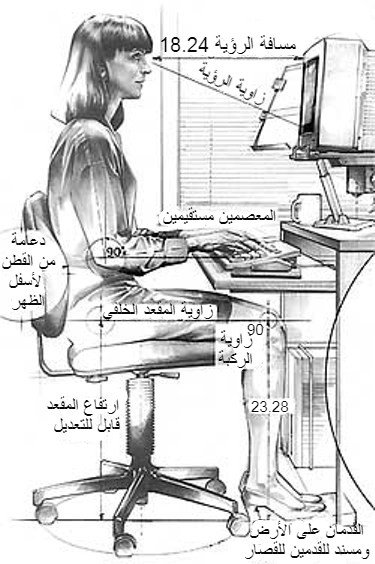
- Check the weight limit against your body weight with margin — 300+ lbs covers most adults; 400 lbs (Leap) covers nearly everyone.
- Check the seat height range — you need your feet flat on the floor with thighs roughly parallel. The Leap’s 15.5″–20.5″ range covers most adults; if you’re very tall or short, verify.
- Confirm adjustable seat depth or multiple shell sizes. Fixed one-size seats are the most common fit failure.
- Look for a 12-year warranty. Both Herman Miller and Steelcase back their flagship chairs for 12 years — that’s the industry signal for a chair built to last. Short warranties on expensive chairs are a red flag.
A chair is only half the workstation. See our standing desk buying guide for the frame specs that matter, and our desk height setup guide to dial in the measurements once your chair arrives.
2 thoughts on “Ergonomic Office Chair Buying Guide: The Adjustments That Matter”
Comments are closed.